Home > Shop > Post Processing Tools > Editing Devices > Display > Projector > Zebronics Zeb Pixa Play 16 FHD Smart LED Projector 4000 Lumens

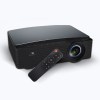
Zebronics Zeb Pixa Play 16 FHD Smart LED Projector 4000 Lumens

Authorised Dealer Zebronics

Zebronics Zeb Pixa Play 16 FHD Smart LED Projector 4000 Lumens

In stock (can be backordered)

SKU: Zeb-PixaPlay 16
Authorised Dealer Zebronics

Features

Features:

  • 1080p FHD Smart LED Projector
  • Quad-core processor
  • App support
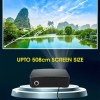
  • Screen size up to 508cms
  • 4000 lumens
  • Electronic focus via remote
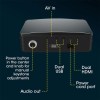
  • Multi-connectivity options like AV in/ AUX out, Dual USB, Dual HDMI
  • Built-in speaker
  • Remote control

20,990.00

In stock (can be backordered)

BEST BUY 20,603.00 Save 2% by paying through Bank & UPI

1
+ Orders Fulfilled

Description

ZEB-PixaPlay 16 is a 1080p FHD Smart LED Projector. It comes with a Quad-core processor that makes it super easy to install and browse apps like Youtube, Netflix, & more via inbuilt Wi-Fi. The smart projector delivers the ultimate home theater experience with an impressive screen size of up to 508cms. Get crystal clear picture quality with 4000 lumens. The smart LED projector has multi-connectivity options like BT/ AV in/ AUX out, Dual USB, Dual HDMI and has a built-in speaker.

Stay entertained with ZEB-PixaPlay 16, a 1080p FHD smart LED Projector. It comes with Quad-core processor that makes it super easy to install and browse apps like Youtube, Netflix, & more via inbuilt Wi-Fi. The smart projector delivers the ultimate home theater experience with an impressive screen size of up to 508cms. Watch your favorite movies, series, presentations, online learning classes, games, and more with crystal clear visuals and a built-in speaker.

The smart LED projector comes packed with technology for crystal clear picture quality with 4000 lumens brightness. It ensures that the content looks stunning and bright in most conditions.

The smart projector comes with a high quality and long life LED Lamp. This lamp ensures consistent performance and gives you the best video experience.

Connect your Laptop, PC, DVD / Blu-Ray player, etc easily and seamlessly with Dual HDMI. Older devices can be connect as well, with the AV port.

The smart LED Projector has built-in Airplay/DLNA/Miracast to stream content from your phone/ other devices directly to the screen.

Enjoy the larger-than-life visual experience as the smart LED projector supports up to 508cm screen size with stunning visuals that elevate your viewing experience.

The projector comes with electronic focus control via the remote. Sit back and enjoy the content with sharp focus.

The smart projector comes with 1080p FHD native resolution so you can enjoy stunning visuals, crisp and sharp images, and videos taking your entertainment experience to a new level.

The projector comes with built-in dual band 2.4Ghz and 5Ghz Wi-Fi to let you stream content directly on the projector without the hassle of connecting to any other source device. You can also connect a speaker wirelessly, with the help of BT v5.1. It also has 8GB in-built storage.

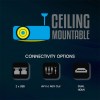
It comes with a ceiling mounting facility for optimal placement and ease of use.

The projector comes with two USB ports, which can be used to connect a pendrive to play content. You can also connect a keyboard and mouse to these USB ports and use them as an input device.

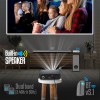
Enjoy the immersive audio experience as the smart LED projector has a built-in speaker that packs powerful sound into your visuals. For a complete home theater experience, you can add a speaker from our wide range of compatible speaker models.


UnBoxing

UnBoxing

Sr. Particular Qty
1 Projector 1
2 Power Cable 1
3 HDMI Cable 1
4 AV Cable 1
5 Remote Control 1
*This is for reference purpose only. Sharp Imaging does not assure the contents as contents, specifications may change time to time as per respective manufacturer’s policies.


Reviews (0)

Reviews

There are no reviews yet

Add a review
You must be logged in to post a review Log In
Q & A (2)

Q & A

Ask a question
Zebronics Zeb Pixa Play 16 FHD Smart LED Projector 4000 Lumens Zebronics Zeb Pixa Play 16 FHD Smart LED Projector 4000 Lumens
Your question
* Question is required
Name
* Name is required
BUILT IN SPEAKER = ? WATTS SATHISH KUMAR asked on 28/11/2023

The Zebronics Zeb-PixaPlay 16 projector features a built-in speaker; however, the exact wattage of the speaker is not specified in the available product documentation or official sources.

🔊 Audio Capabilities
Built-in Speaker: The projector includes an integrated speaker, providing basic audio output for casual viewing.

External Audio Options: For enhanced sound quality, the PixaPlay 16 supports external audio connections via its AUX OUT port, allowing you to connect external speakers or audio systems.

Wireless Audio: Additionally, the projector supports wireless audio output through Bluetooth v5.1, enabling you to connect Bluetooth-enabled speakers or headphones for a more immersive audio experience.

🎯 Conclusion
While the exact wattage of the built-in speaker is not specified, the Zeb-PixaPlay 16 offers flexibility in audio output, allowing users to connect external or Bluetooth speakers to suit their audio preferences.

If you have further questions or need recommendations for compatible external speakers, feel free to ask!

Sharp Imaging answered on 19/05/2025 store manager
(1) (0)
Add an answer
Your answer
* Answer is required
Name
* Name is required
How to update on playstore or add any app like educational xseed app Narasimha asked on 25/03/2023

Yes, the Zebronics Zeb Pixa Play 16 FHD Smart LED Projector supports installing apps like the XSEED educational app from the Google Play Store.

✅ How to Install Apps on Zeb Pixa Play 16
Power On the Projector: Ensure the projector is connected to a Wi-Fi network.
Zebronics

Access the Home Screen: Navigate to the home screen using the remote control.

Open the App Store: Locate and open the Google Play Store app.

Search for the App: Use the search function to find the desired app, such as "XSEED."

Install the App: Select the app from the search results and click "Install."

Launch the App: Once installed, you can open the app directly from the Play Store or find it in your apps list.

📱 Alternative Installation Methods
If the Play Store is not accessible or you prefer alternative methods:

Use a USB Drive: Download the APK file of the app from a trusted source on your computer. Transfer the APK file to a USB drive and plug it into the projector's USB port. Use a file manager app on the projector to locate and install the APK.

Screen Mirroring: Utilize features like Miracast, AirPlay, or DLNA to mirror your smartphone or tablet's screen to the projector. This allows you to run the app on your mobile device while displaying it on the projector.

🔧 Additional Tips
Remote Control Navigation: To facilitate easier navigation, you can connect a wireless keyboard and mouse to the projector via USB.

App Compatibility: Ensure that the app is compatible with Android 9.0, the operating system of the Zeb Pixa Play 16.

If you need further assistance with installing specific apps or have other questions about the projector, feel free to ask!

Sharp Imaging answered on 19/05/2025 store manager
(1) (0)
Add an answer
Your answer
* Answer is required
Name
* Name is required

Specification

General Information

Screen size

111-508cm

Native Resolution

1920 x 1080 FHD

RAM

1GB

Core Processor

Quad Core Processor

Storage (ROM)

8 GB

Android Version

9

Physical Information

Weight 2.5 kg
Dimensions 40.5 × 13.8 × 27.8 cm